

 PKR
PKR 
Deploying modern backend apps—like Express.js, Flask, or Django—is now straightforward with HosterSale’s cPanel hosting plans. Whether you’re starting fresh or scaling up, use one of two smooth methods:
- GUI Deploy (no terminal) – For all users on any plan
- SSH Deploy (advanced) – For Business and VPS users
🧭 HosterSale Hosting Plan Features at a Glance
| Plan Type | cPanel App Managers for Node.js & Python | SSH Access | Best Suited For |
|---|---|---|---|
| Shared Hosting | ✅ Yes | ❌ No | Beginners, lightweight apps |
| Business Hosting | ✅ Yes | ✅ Yes | Developers needing terminal |
| VPS Hosting | ✅ Yes | ✅ Full | High-traffic or production |
HosterSale includes cPanel App Managers in every plan—enabling deploys without SSH, plus SSH access available in Business & VPS.
🟩 Method 1: GUI Deployment via cPanel (No Terminal Required)
Ideal for shared or business hosting users who want a simple point‑and‑click setup.
🔹 Python Apps (Flask, Django)
- Log into cPanel and click Setup Python App under Software.
- Click Create Application, choose Python version, app root, and public URL.
- Upload your code via File Manager or FTP.
- Click Edit, specify the
requirements.txtpath, then click Run Pip Install. - Set your Startup File (e.g.,
app.py) and Entry Point, then save. - Use Start, Restart, Pause, or Stop buttons to control your app.
🔹 Node.js Apps (Express, Next.js, etc.)
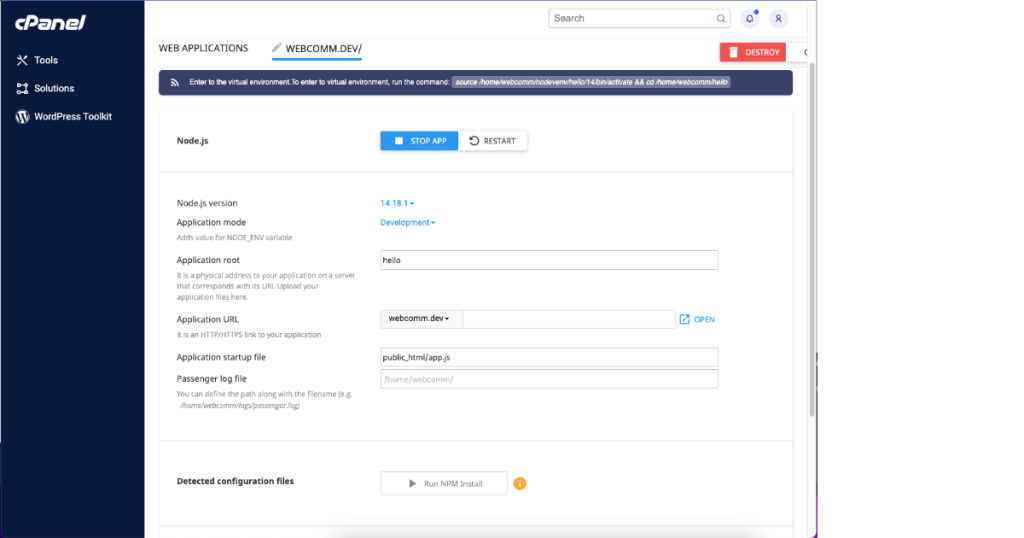
- In cPanel, open Setup Node.js App under Software.
- Click Create Application, choose Node.js version, application folder, and startup file (e.g.,
app.js). - Upload your
package.jsonand code. - Click Run NPM Install to install dependencies.
- Use the GUI to Start, Restart, Pause, or Stop your app.
- Set environment variables with the Add Variable option.
This interface-based setup is clean, accessible, and does not require terminal commands.
Related: Top Free and Paid Web Hosting Control Panels in 2025
🧑💻 Method 2: SSH Deployment (Advanced / Business & VPS Plans)
For developers who prefer command-line control and want to use tools like PM2.
🔹 Python via SSH
cd ~/yourapp
python3 -m venv venv
source venv/bin/activate
pip install -r requirements.txt
touch tmp/restart.txt
Ensure your wsgi.py (or passenger_wsgi.py) defines an application object so Passenger can serve it. Updating the restart.txt file tells Passenger to reload your changes.
🔹 Node.js via SSH
cd ~/yourapp
npm install
node server.js
For persistent deployment (especially on VPS):
npm install pm2 -g
pm2 start server.js
pm2 save
PM2 keeps your app running even after your SSH session ends.
Related: Smarter, Faster, Safer: How HosterSale’s AI Hosting Transforms Your Website
⚠️ Terminal Safety Tips
- ❌ Never use
sudo,chmod 777, or destructive commands likerm -rf /. - ✅ Always activate your virtual environment before installing packages.
- ✅ Use
python3to avoid conflicts with older Python versions. - ✅ To restart cleanly, use
touch tmp/restart.txtrather than kill signals. - ✅ Monitor logs safely with
tail -f error_log.
FAQ
Q: Can I host Node.js and Python apps on HosterSale Shared Hosting?
A: Yes—cPanel App Managers are included in all HosterSale plans. SSH access is optional and available in Business and VPS.
Q: Do I need terminal access to deploy?
A: No. The GUI-based method covers most workflows—uploading code, installing dependencies, and managing your app manually via cPanel.
Q: How can I install dependencies inside cPanel?
A: Use the Run Pip Install or Run NPM Install buttons in the corresponding App Manager.
Q: The app shows HTTP 500 – what should I check?
A: Validate Startup File and Entry Point, ensure the dependency file is correct, restart the app, and inspect the app logs.
Q: Which HosterSale plan is best for production?
A: Shared Hosting is great for simple apps; Business is ideal for development with terminal access; VPS offers full control for scaling and customization.
✅ Final Thoughts
cPanel offers a reliable, clean interface to deploy Node.js and Python apps—especially when paired with HosterSale’s developer-focused hosting. Whether you prefer GUI or CLI, we support you:
- 🟢 GUI deployment for quick and safe setup (all plans)
- 💡 CLI deployment for flexibility and advanced configuration (Business/VPS)
- 🚀 VPS for high-demand, production environments
👨💻 Ready to launch your backend? Head over to HosterSale Hosting Plans and pick your preferred setup—start deploying today!
